From Crypto Mining Attack to Secure Infrastructure: Lessons in Self-Hosted Security


How a Next.js vulnerability led to cryptocurrency miners on our servers, and why our £39/month self-hosted infrastructure still beats expensive PaaS solutions
The Discovery
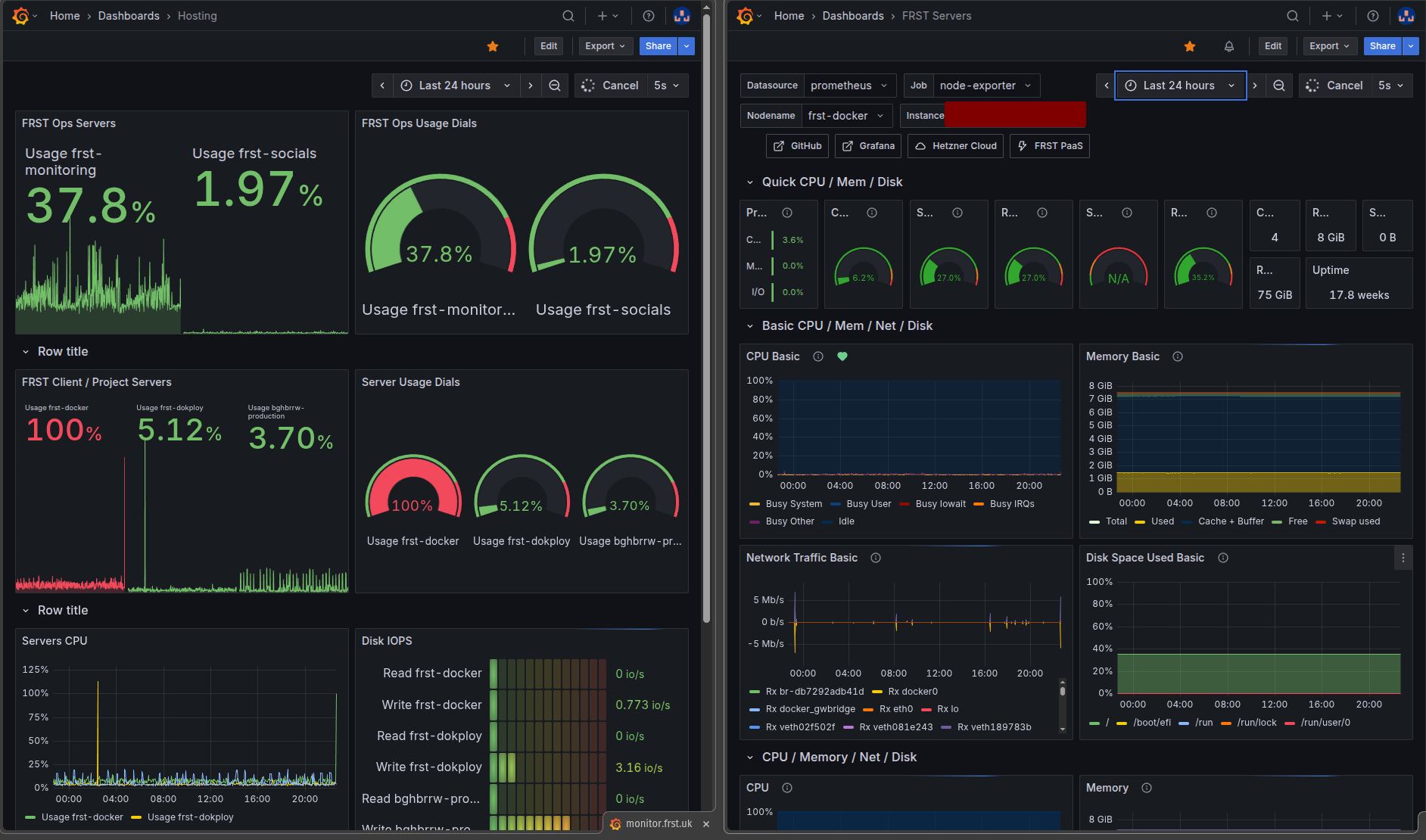
It was a Tuesday morning when I checked my Grafana dashboard and saw something that made my coffee go cold: CPU usage at 400% on our staging server. Not a brief spike during a build—sustained, relentless consumption that had been running for hours.
I SSH'd into the server and ran top. There it was, plain as day:
USER PID %CPU COMMAND 1001 97260 395 /tmp/xmrig-6.24.0/xmrig --url pool.supp...
We had been hacked. Cryptocurrency miners were running on our infrastructure.
The "oh shit" moment hit hard. My mind raced through the implications: how many servers were affected? How long had this been running? What data had been compromised? And perhaps most pressingly—how did they get in?
What started as a routine morning quickly became an intensive incident response that would span several days, and ultimately make our infrastructure significantly more secure.
This is the story of that incident, what we learned, and why despite getting hacked, our self-hosted infrastructure approach at £39/month still provides better value and control than expensive PaaS solutions.
The Investigation: Finding the Root Cause
After the initial shock wore off, I moved into investigation mode. The first priority was understanding the scope of the breach.
What We Found
The miner wasn't just on one server—it was on both our staging environment (frst-docker) and a production environment (bghbrrw-production). The xmrig cryptocurrency miner was running as container user 1001.
The malware had installed itself in two locations:
/tmp/xmrig-6.24.0/xmrig/app/apps/frontend/node_modules/next/dist/server/lib/xmrig-6.24.0/xmrig
That last location was the smoking gun. The miner had been injected into a Next.js application's dependency tree.
The Vulnerability
After checking the dependencies, I discovered we were running Next.js 15.5.2—right in the vulnerable range. A critical Remote Code Execution (RCE) vulnerability in Next.js versions 15.5.0 through 15.5.6 had been exploited. The vulnerability in React's Flight protocol allowed attackers to execute arbitrary code on our servers without any authentication.
But there was another factor that made the attack easier: an exposed database port.
During the initial setup of our self-hosted infrastructure, in a schoolboy error moment I'd exposed port 6380 (Redis caching) to the public internet for communication between applications. Thankfully this wasn’t on high traffic production servers and the websites running this vulnerability were in still in development. A major lesson learned though!
The Response: Systematic Cleanup and Hardening
With the scope understood, I moved into remediation mode. This required a methodical approach to ensure I cleaned everything without missing anything.
Phase 1: Immediate Containment
First priority: stop the bleeding.
# Kill the miner processes
pkill -9 xmrig

# Stop compromised containers
docker stop $(docker ps | grep bough | awk '{print $1}')

# Block database port immediately
ufw deny 6380  # Redis

# Block at iptables level (Docker bypasses UFW)
iptables -I DOCKER-USER -p tcp --dport 6380 -j DROP
netfilter-persistent save
That last part is crucial: Docker bypasses UFW by default. If you only use UFW, Docker will happily expose ports anyway. You need iptables rules in the DOCKER-USER chain to properly block ports. I also removed the public URLs for the exposed services. I
Phase 2: Dependency Updates
With the miners stopped, I needed to patch the vulnerability:
# Update Next.js to patched version
pnpm update next@latest

# Updated to 16.1.1
# Clean install to ensure no lingering malware
rm -rf node_modules pnpm-lock.yaml && pnpm install

# Audit for other vulnerabilities
pnpm audit --production
The audit revealed a couple of other high-severity vulnerabilities—nothing as critical as the Next.js RCE, but issues that needed addressing nonetheless. I updated the offending packages.
Phase 3: Infrastructure Hardening
Patching the vulnerability wasn't enough. The compromised Docker images were still in our registry, and cached layers could reintroduce the malware.
The problem: Our CI/CD pipeline used a shared build cache across all environments (dev, staging, production). When building production images, Docker pulled cached layers from old dev builds—some of which contained the miner.
The fix: Separate build caches per environment.
# Before (shared cache)
cache-from: type=registry,ref=ghcr.io/owner/app:buildcache
cache-to: type=registry,ref=ghcr.io/owner/app:buildcache

# After (environment-specific caches)
cache-from: type=registry,ref=ghcr.io/${{ github.repository_owner }}/frontend-app:buildcache-${{ needs.detect-changes.outputs.environment }}
cache-to: type=registry,ref=ghcr.io/${{ github.repository_owner }}/frontend-app:buildcache-${{ needs.detect-changes.outputs.environment }},mode=max
Phase 4: Complete Rebuild
With patches in place and build system fixed, I rebuilt everything from clean sources:
# Delete ALL old images
docker rmi -f $(docker images | grep boughandburrow | awk '{print $3}')

# Clear Docker build cache
docker builder prune -af
# Trigger clean builds via GitHub Actions
git commit --allow-empty -m "security: trigger clean rebuild" && git pushPhase 5: Verification
After deploying the clean images, I monitored both Grafana and iclosely for 48 hours:
# Check for miner processes every 10 minutes
ps aux | grep -iE "xmr|mine" | grep -v grep

# Monitor CPU usage
htop

# Verify no malware in containers
for container in $(docker ps -q);
  do docker exec $container find /app -name "*xmrig*" 2>/dev/null || echo "Clean" done
CPU usage swiftly returned to normal (~4%). No miner processes appeared. The infrastructure was clean.
The Prevention Strategy: Never Again
Cleaning up the attack was one thing. Ensuring it never happened again required building proper safeguards.
Comprehensive Monitoring
We already had Grafana and Prometheus set up, but I hadn’t yet configured them for alerts. So I implemented:
CPU Alerts:
- Warning threshold: >30% sustained CPU (catches excessive activity early)
- Critical threshold: >50% sustained CPU usage
- Alert interval: Initially every minute then reducing frequency when I was sure everything was running smoothly
- Notification: Discord webhook that posts messages in my Foresite discord server for immediate visibility
The Runbook: I created a detailed incident response runbook in Linear documenting:
- Investigation steps (what commands to run)
- Common causes (miners vs legitimate high CPU)
- Response procedures (kill processes, stop containers, verify cleanup)
- Prevention checklist (firewall rules, dependency updates, image verification)
Security Hardening Checklist
I documented our complete security posture:
Network Security:
- ✅ No database ports exposed to public internet
- ✅ UFW configured with
deny incomingdefault - ✅ iptables DOCKER-USER rules for port blocking
- ✅ Hetzner Cloud firewall configured as additional layer
- ✅ Only HTTP/HTTPS/SSH allowed publicly
Application Security:
- ✅ Dependabot configured to monitor the repo for any issues
- ✅ Regular dependency audits (
pnpm auditweekly) - ✅ Immediate updates for critical vulnerabilities
- ✅ Separate build caches per environment
- ✅ Image verification before deployment
Operational Security:
- ✅ Comprehensive monitoring with alerts
- ✅ Documented response procedures
- ✅ Regular security reviews
Ongoing Practices
Security isn't a one-time fix—it's an ongoing practice:
- Weekly: Run
pnpm auditon all projects - Monthly: Review firewall rules and exposed ports
- Quarterly: Test incident response procedures
- Always: Update critical vulnerabilities immediately
The Infrastructure Reality Check
Here's where the story takes an interesting turn. Despite this security incident, our self-hosted infrastructure remains significantly more cost-effective and flexible than PaaS alternatives.
Our Complete Setup: £39/month
Hetzner VPS (£28/month):
- 5 VPS servers across multiple locations
- 18 vCPUs total (mix of 2 and 4 vCPU instances)
- 30GB RAM total
- 280GB SSD storage
- Full production environments for multiple projects
- Staging/testing environments
- Complete monitoring stack
GitHub Pro (£11/month):
- CI/CD via GitHub Actions (unlimited private repos)
- Container registry (GHCR) for Docker images
- Unlimited collaborators
- GitHub Copilot for development
What We Run:
Production Sites:
- Bough & Burrow (Next.js e-commerce + Medusa backend)
- Creativity in Coombe (Astro website & Sanity CMS)
- FRST website (Astro + Sanity CMS)
- Yore landing page
Staging Sites:
- Yore staging environment - staging landing page, Laravel API backend and the NextJS frontend app
- Bough & Burrow Staging site
Infrastructure:
- Grafana + Prometheus monitoring
- OpenPanel analytics
- Dokploy orchestration
- Traefik reverse proxy
- PostgreSQL + Redis databases
- Full DevOps pipeline using GitHub Actions and Container Repository
The PaaS Alternative: £200-500+/month
Let's be honest about what this setup would cost on popular PaaS platforms:
Vercel/Netlify:
- Pro tier per project: £20-40/month
- 3 production projects: £60-120/month
- Add-ons (analytics, monitoring): +£30-50/month
- Subtotal: £90-170/month
Heroku:
- Production dynos: £25/month per project
- Database hosting: £9-50/month per database
- Redis: £15/month per instance
- 3 projects with databases: £150-225/month
- Subtotal: £150-225/month
Managed Monitoring:
- Datadog/New Relic: £20-75/month
- Subtotal: £20-75/month
Total PaaS Cost: £260-470/month
Even being conservative, PaaS would cost us 6-12x more than our current setup. That's £2,800-5,000 per year in savings.
The Hidden Costs (Being Honest)
But cost isn't the only factor. Self-hosting has real overhead:
Time Investment:
- Initial setup: ~20 hours
- Monthly maintenance: ~5 hours
- This incident response: ~15 hours
- Total first year: ~120 hours
Knowledge Requirements:
- Linux system administration
- Docker and containerization
- Network security and firewalls
- Incident response procedures
- Backup and disaster recovery
Risk Factors:
- You're responsible for security
- Downtime is on you to fix
- No support team to call
- Learning curve can be steep
The Value Equation
So is it worth it? For me, absolutely. Here's why:
£39/month × 12 months = £468/year PaaS alternative = £3,000-5,600/year Savings = £2,500-5,100/year
Even accounting for 120 hours of time investment in year one, if you value your time at £20/hour (£2,400), you're still saving £100-2,700 in year one. In subsequent years with less setup time, savings increase dramatically.
But beyond just money:
Control: We can configure anything, optimize everything, and aren't locked into vendor decisions and don’t run the risk of unexpected costs when traffic peaks or issues arise.
Flexibility: Need to scale up? Increase VPS resources. Scale down? Decrease. No vendor lock-in or having to upgrade to the next pricing tier.
Client Value: We now offer infrastructure services to clients at competitive rates and reducing ongoing costs on client projects considerably.
Key Lessons Learned
This incident was fairly expensive in time and stress, but invaluable in lessons:
1. Monitoring Is Non-Negotiable
We caught this attack because of proper monitoring. Without Grafana showing that 400% CPU spike, the miners could have run for weeks. The cost of implementing monitoring (£0 with self-hosted Prometheus/Grafana) is infinitely less than the cost of not having it and had we been using a service like Vercel, it could have cost us a small fortune in overage costs.
Action: Set up comprehensive monitoring from day one. CPU, memory, disk, network—all of it.
2. Only Expose Essential Ports
The exposed Redis ports? It seemed convenient for debugging, but it was a critical security mistake.
Action: Use Docker’s internal networking for service to service communication. Never expose database ports to the public internet!
3. Docker Bypasses UFW
This one caught me by surprise. I had UFW rules denying traffic to port 6380, but Docker was still accepting connections. Docker modifies iptables directly, bypassing UFW.
Action: Use iptables DOCKER-USER chain for port blocking that Docker respects.
4. Keep Dependencies Updated
The Next.js RCE vulnerability had been patched for weeks. We were vulnerable because we hadn't updated — I was still developing the the project, so was a little slack in running audits and hadn’t set up Dependabot yet. Security patches exist for a reason—apply them promptly.
Action: Weekly dependency audits, immediate updates for critical vulnerabilities.
5. Build Caches Can Be Poisoned
The shared build cache meant production images could pull compromised layers from infected builds. Once the cache was poisoned, every build potentially reintroduced the malware.
Action: Separate build caches per environment. Add image verification steps.
6. Incident Response Is a Skill
My first instinct was to panic. Forcing myself to slow down, document findings, and work methodically saved time and prevented mistakes.
Action: Document procedures before you need them. Practice incident response. Stay calm.
7. Document Everything
Clear documentation saves time and reduces errors during high-stress situations. The runbook I created during this incident will be invaluable should anything like this happen again.
Action: Write runbooks for common scenarios. Update them after each incident.
The Takeaway
Getting hacked was not fun. Those first few hours of discovery and investigation were a little stressful. The time spent on cleanup and rebuilding were tedious. But the result is infrastructure that's more secure, better monitored, and thoroughly understood.
For Businesses Evaluating Hosting Options
You don't need expensive PaaS solutions. With the right knowledge and practices, self-hosted infrastructure provides:
- 80% cost savings (£468/year vs £3,000-5,600/year)
- Better security when properly configured (you control everything)
- Greater flexibility (scale up or down without vendor constraints)
- Valuable learning (incidents become education opportunities)
But be honest about the trade-offs. Self-hosting requires:
- Technical knowledge or willingness to learn
- Time investment in setup and maintenance
- Taking responsibility for security and uptime
- Building proper monitoring and response procedures
For Developers and Technical Teams
This incident made our infrastructure demonstrably stronger. I now have:
- Battle-tested security practices
- Comprehensive monitoring and alerting
- Clear incident response procedures
- Proven cost savings and ROI
- Deep infrastructure knowledge
Those capabilities compound. I can now offer infrastructure services to clients, troubleshoot issues faster, and make informed technical decisions based on real-world experience.
The FRST Value Proposition
This is what FRST (Fast Reliable Sites & Technology) is about: helping businesses build production-grade infrastructure at a fraction of PaaS costs, with excellent performance, security, and control.
We've learned these lessons the hard way so our clients don't have to. We've built the monitoring, written the runbooks, and developed the expertise to deploy and maintain secure, cost-effective infrastructure.
Technical Details
Attack Timeline
- Aug 25, 2025: Initial compromise
- Aug 26, 2025: Spotted extreme CPU usage on the staging server. Full investigation and systematic cleanup
- Aug 27, 2025: Clean deployment verification and infrastructure hardening complete. Prometheus added to Grafana monitoring deployed
- Aug 30, 2025: Monitoring review and documentation finalised
Vulnerability Information
- CVE: Next.js RCE in React Flight protocol
- Affected Versions: 15.5.0 - 15.5.6
- Patched Version: 15.5.7+ (we upgraded to 16.1.1)
- Severity: Critical (9.8 CVSS)
- Attack Vector: Remote, no authentication required
- Exploit: Allows arbitrary code execution on affected servers
Infrastructure Specifications
- Servers: 5× Hetzner Cloud VPS (ARM64 architecture)
- Orchestration: Docker Swarm + Dokploy
- Monitoring: Grafana + Prometheus + Node Exporter
- Reverse Proxy: Traefik v3.3
- CI/CD: GitHub Actions
- Container Registry: GitHub Container Registry (GHCR)
- Databases: PostgreSQL 16, Redis 7
Security Configuration
Firewall (UFW):
Default: deny (incoming), allow (outgoing)
Allow: 22/tcp (SSH), 80/tcp (HTTP), 443/tcp (HTTPS)
Deny: All other ports
iptables DOCKER-USER Chain:
DROP tcp -- 0.0.0.0/0 0.0.0.0/0 tcp dpt:6380Hetzner Cloud Firewall:
Inbound Rules:
- SSH (22/tcp) from specific IPs
- HTTP (80/tcp) from anywhere
- HTTPS (443/tcp) from anywhere
- Node Exporter (9100/tcp) from Prometheus server only
This post is part of our ongoing series on infrastructure, security, and cost optimisation. Follow along as we share real-world experiences building and maintaining production systems.

Dave
Founder & Creative Developer at Foresite.
Dave is a technology and nature enthusiast who in his free-time enjoys volunteering at a local conservation project and is known for his skills in creative development & more recently, hazel hurdle making. He is passionate about technology, archaeology, Viking history, and rural skills. One of his free-time projects is a web3-based social app for archaeology enthusiasts, combining his passion for modern tech and his love for history.